Olá! Sou o Tadas.
I'm going to show an useful thing for everyone, so i'll write in English.
It is about accents when writting in Portuguese.
There are 4 different accents: wave (~), right (´), left (`) and reversed tick (^).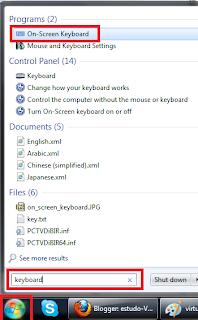 For a better explanation, i suggest you to turn on "On screen keyboard".
If you are using Windows 7 OS or Vista, just press "START" button
and in a search field write "keyboard"
"On screen keayboard" will appear on top of a list.
If you are using Windows XP, then you can find it in:
Start -> Programs -> Accessories -> accessibility ->
"On screen keyboard"
For Mac's:
http://www.techiecorner.com/1048/on-screen-keyboard-in-mac-os-x/
It will be little different, but the main idea is the same:
to see which letter is dedicated for any keyboard's button in that language.
If you would change typing language, you can see, that letters changes too.
(Try change between English/Portuguese/Lithuanian)
If you press "caps lock" or "shift", you can see, whether capital letters or another symbols are activated (Like our interested - accent symbols)
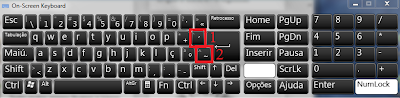
I marked them in red and dedicated numbers.
The point to understand:
"SHIFT" activates capital letters AND ` ^ accents only for capital letters.
"CAPS LOCK" activates ONLY CAPital letters. Accents ´ ~ stays same.
So if you want to get á, you need to press button "1" and then letter "a".
{That is the same for é, í, ó, ú, ý}
ã, you need to press button "2" ant letter "a".{That is the same for õ}
à, first press "caps lock" (activate capital letters), AND THEN
"HOLD shift" (Activate accents ` ^ and DEactivate capital letters), nr. 1 and "a".
{That is the same for è, ì, ò, ù}
â, first press "caps lock", "HOLD shift", nr. 2 and "a".
{That is the same for ê, î, ô, û}
To get capital letters:
Á - "caps lock" (activate capital letters), nr. 1 and "A". [É, Í, Ó, Ú, Ý]
à - "caps lock" (activate capital letters), nr. 2 and "A". [Õ]
À - "HOLD shift", nr. 1 and "A". [È, Ì, Ò, Ù]
 - "HOLD shift", nr. 2 and "A". [Ê, Î, Ô, Û]
It's like a vice versa thing, but that's how it is.
Hope, it helped you.
P.S. I believe, same accent thing can be found for any language.
I don't know how it is done, but i'm sure, there is way.
P.S.S. if you would press right "ALT" button,
you can see, how symbols changes in each language.
.JPG)


